Maze generation algorithm in Python – drawing and arrays
There are plenty of maze generation algorithms, some are described here and here. I decided to use one to learn some Python. I chose Recursive Backtracker. You can find longer descriptions in both links, but briefly:
- choose a random cell in the maze
- walk in a random direction
- when there is no possibility to walk farther, go back (backtrack) to find the first cell from which it is possible to proceed
- the algorithm ends when there is no possibility to move from any cell
Table of contents
Python IDE
Since it was my first Windows program in Python, I had to start with an IDE. At first, I tried Trinket, but it missed some features of Matplotlib. Next was Visual Studio Code. I swear at some moment the code stopped compiling when I used the official Python extension. When I checked it today, it worked very well…
Anyway, I used a GUI I already had installed as part of Anaconda suite – Spyder IDE. It’s not perfect, but it’s quite fine, and it has some code analysis and a debugger.
As I started learning Python, I discovered some oddities and learned how to apply object-oriented patterns in Python. Maybe pure OO code shouldn’t be written in this language, but I had no trustworthy resource at a hand.
Note: I'll soon be sharing short, practical tips on Angular — a good way to pick up something new if you're interested.
Drawing
I spent a lot of time trying to figure out how to draw a simple line as part of my maze. Just a line. I found solutions that used Turtle, PyGame, ASCII, Matplotlib, Tkinter, to name some. Turtle? Chart library? ASCII? And sophisticated graphics libraries? I was surprised there was nothing quick available. I was more surprised to find that many people use Matplotlib for drawing shapes and even for animation…
Not too content, I used Matplotlib as well. Here are the most basic tasks:
- import:
import matplotlib.pyplot as pyplot - set size of the image (chart):
pyplot.figure(figsize=(16, 8)) - hide the labels on axes:
pyplot.xticks([]), pyplot.yticks([]) - show the chart:
pyplot.show()(this step seemed unnecessary in that GUI) - draw a line:
pyplot.plot([x1, x2], [y1, y2], color='black'). Now, these are unpredictable parameters: first two Xs, then two Ys. It was confusing enough for me to create a function to draw lines with more intuitive parameters:
So far so “good”. However, my maze algorithm iteratively draws the maze by erasing walls. How to remove a line from the chart? I tried drawing it again, but with white color. As a result, there was a white line with a black border. It didn’t look too clear. So I started experimenting with different styles of charts:
This style, together with white color for lines and black color for erasing, looked good enough. I decided to leave the ticks for easier orientation in the maze.
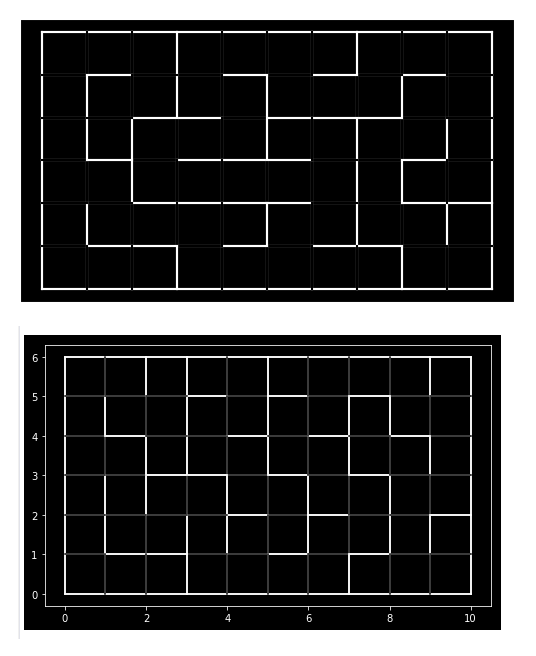
In the top the output from Visual Studio Code, in the bottom from Spyder IDE. It’s hard to create consistent output in any compiler, maybe by customizing every style option in Matplotlib.
Two-dimensional array
It turned out that Python does not support two- or more-dimensional arrays, only jagged arrays. There are libraries, like NumPy, that provide support. I decided to use what was available in pure Python, so I created:
That array has size of size_x * size_y and is filled with False. In order to check the cell in 3rd column (X) and 1st row (Y), I’d have to write: visitedMaze[2][0]. At least referring to that array’s items is simple.
Switch
And the last discovery for today – there is no switch statement in Python! Some suggested workarounds for developers coming from different languages include putting numerous elif (“else if”) or using a dictionary.
The maze
OK, so what about the algorithm itself? It’s not the shortest implementation, but I think it’s quite easy. Check the source maze.py or the entire repository. Adjust size_x and size_y and run for a random maze.
Continue to next lesson – animation.
Lessons learned
Use Matplotlib for simple drawing
Use NumPy for 2D arrays
Be clever when coding a switch
Good Job! This is an awesome post. I couldn’t find it anywhere on google.
You can uses cases instead of switches
Thanks for your comment! That’s right, 2 years after this post was published, match/case was introduced with Python 3.10. Link for details:
https://www.python.org/downloads/release/python-3100/